
External Interfaces
Tiger City IMX Industrial Computer with Linux OS
- USB
- Serial ports
- 1-Wire
- HDMI
- ETHERNET
- GSM
- MicroSD slot
- Wi-Fi/2.4G
- Digital inputs
- Digital inputs/outputs
- Universal inputs/outputs
USB
The device is equipped with 2 USB connectors.
USB1
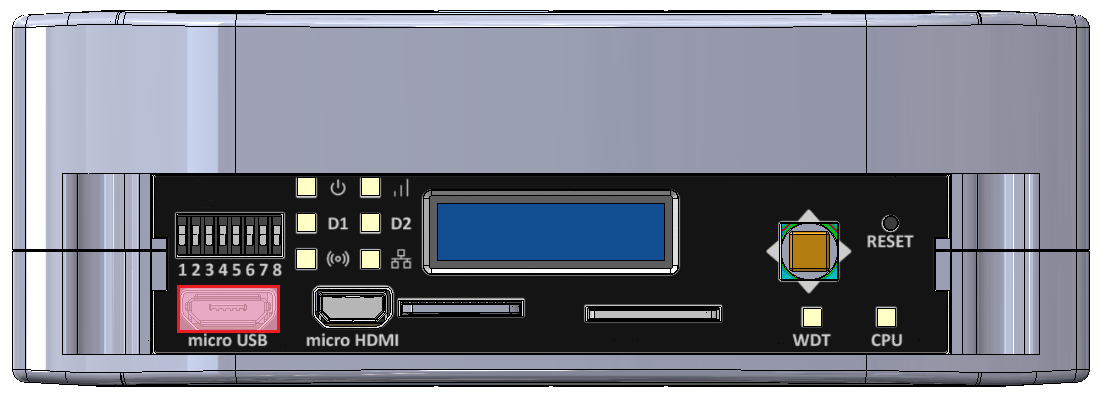
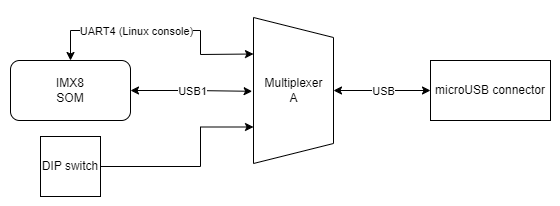
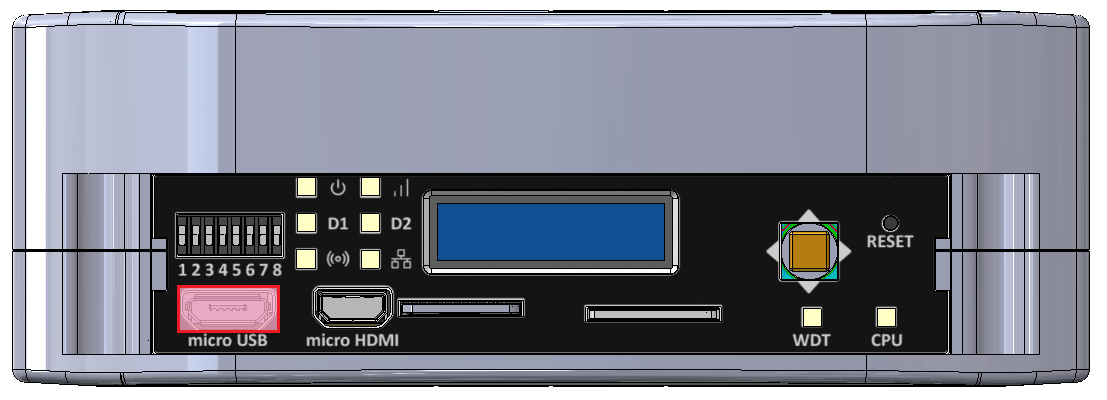
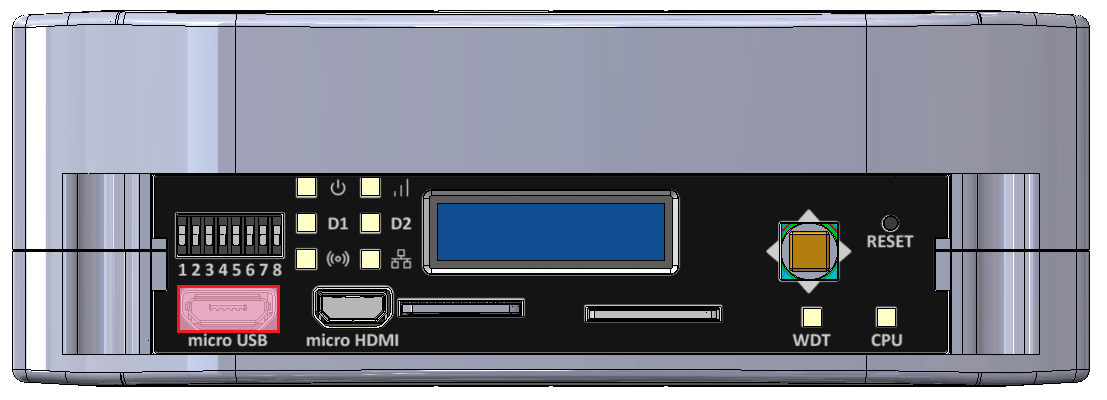
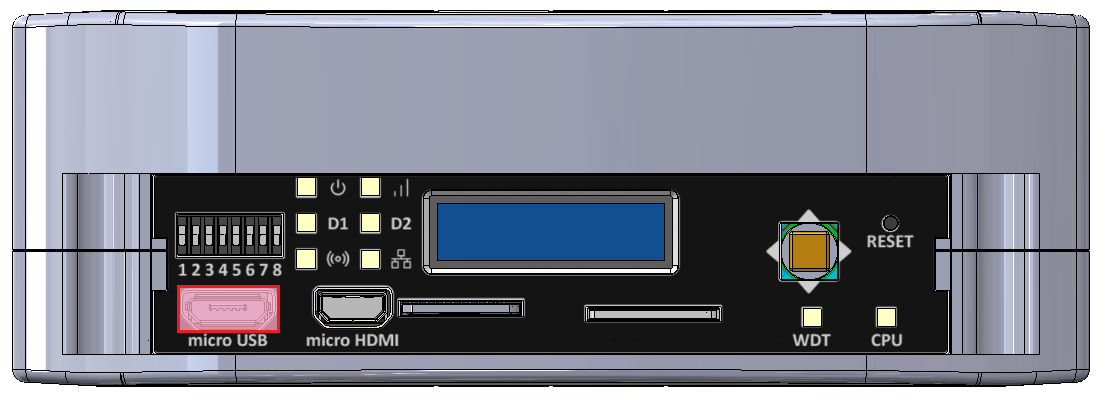
MicroUSB connector for USB 2.0 is placed on the front panel. The interface can work in both host and device modes. The signal on the connector can be changed with a switch. The maximal current of the connector is 500 mA.
MicroUSB connector location
USB1 connection diagram
|
Description |
Processor pin |
Default function |
|
5 V USB voltage |
F22 |
USB1_VBUS |
|
USB data differential pair negative |
A22 |
USB1_D_N |
|
USB data differential pair positive |
B22 |
USB1_D_P |
|
USB on the go |
AB10 |
USB1_OTG_PWR |
UART4
Device name: /dev/ttymxc3
|
Signal |
Processor pin |
Default function |
|
Receive (UART4 RX) |
F19 |
UART4_RXD |
|
Transmit (UART4 TX) |
F18 |
UART4_TXD |
USB2
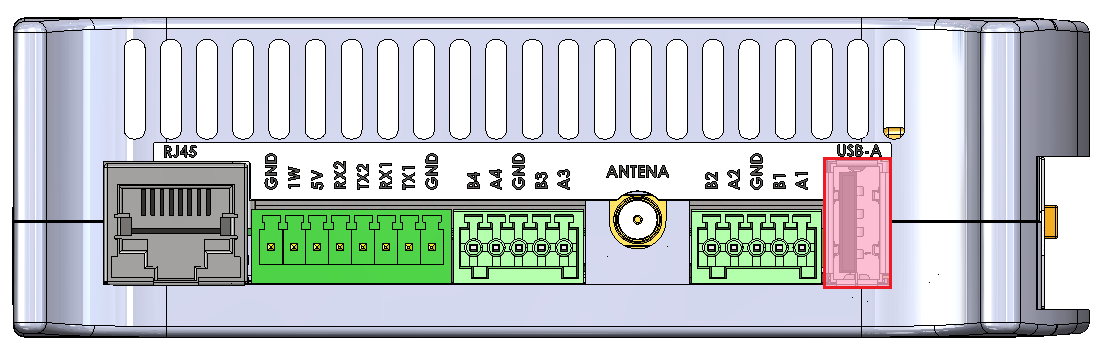
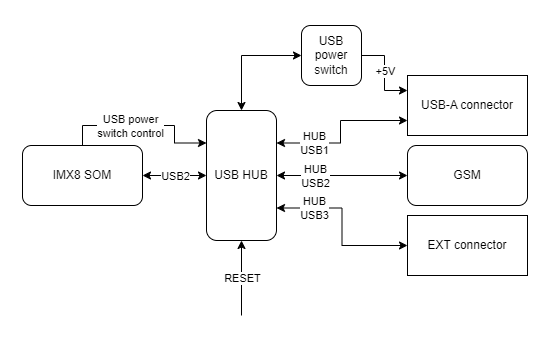
USB-A connector for USB 2.0 is placed on the side of the device with the interface set up in the host mode. The maximal current of the connector is 1 A.
USB-A connector location
USB2 connection diagram
| Description |
Processor pin |
Default function |
|
USB power switch control |
F23 |
USB2_VBUS |
|
USB data differential pair negative |
A23 |
USB2_D_N |
|
USB data differential pair positive |
B23 |
USB2_D_P |
Serial ports
The device is equipped with 3 serial port connectors.
RS485-1/2
Baud rate: 50-115200 bps.
Location of the RS485-1/2 connector
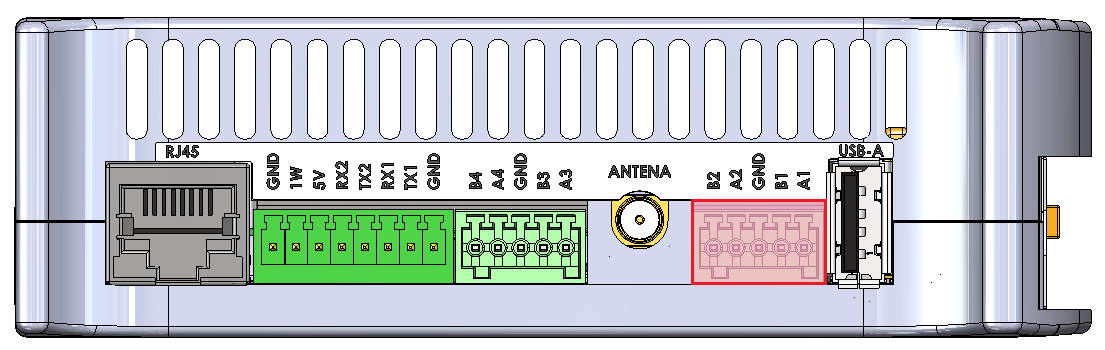
|
Connector pin |
Description |
|
A1 |
RS485 A1 |
|
B1 |
RS485 B1 |
|
G |
Ground |
|
A2 |
RS485 A2 |
|
B2 |
RS485 B2 |
RS485-3/4
Baud rate: 50-115200 bps.
Location of the RS485-3/4 connector
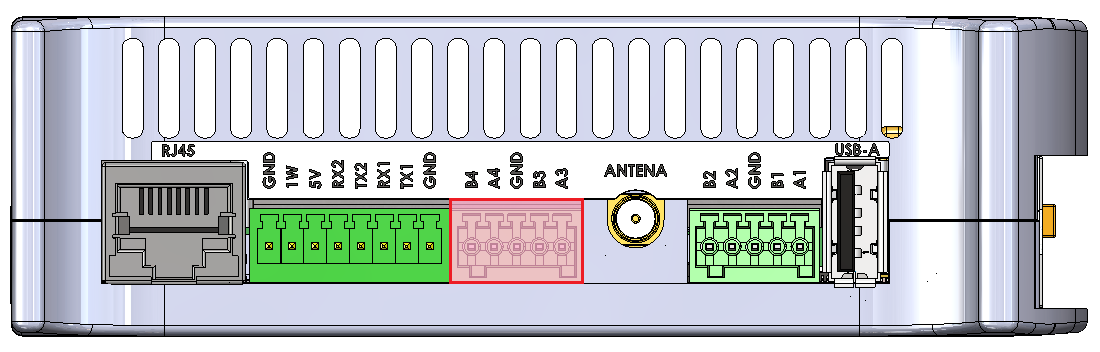
|
Connector pin |
Description |
|
A3 |
RS485 A3 |
|
B3 |
RS485 B3 |
|
G |
Ground |
|
A4 |
RS485 A4 |
|
B4 |
RS485 B4 |
RS485-1/2/3/4 connections diagram
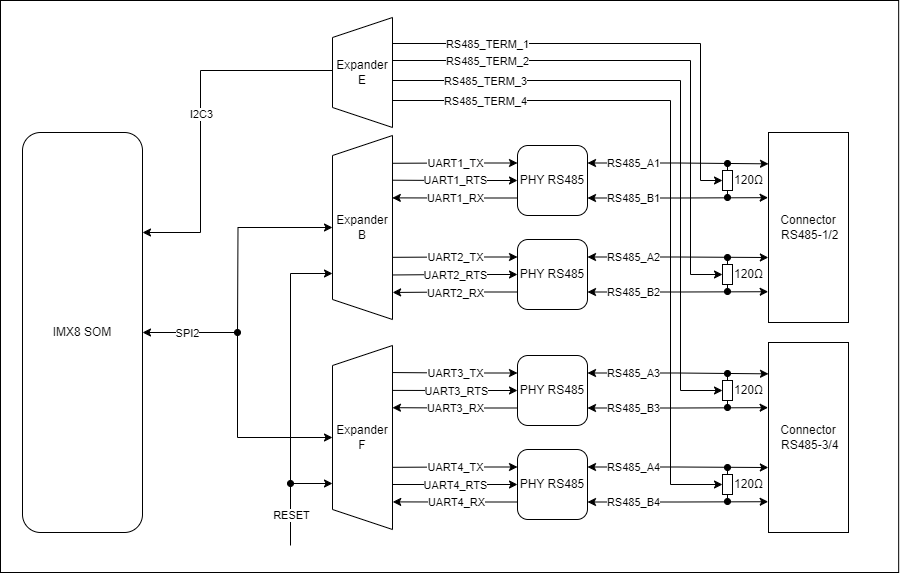
//sprawdzić z Dmytro całkowitą rezystancję terminacji (rezystor + transoptor go załączający)
SPI2
|
Signal |
Processor pin |
Default function |
|
Chip select 0 |
A6 |
SPI2_CS0 |
|
Chip select 1 |
AF12 |
SPI2_CS1 |
|
Chip select 2 |
AB19 |
SPI2_CS2 |
|
Master in slave out |
A8 |
SPI2_MISO |
|
Clock |
E6 |
SPI2_SCLK |
|
Master out slave in |
B8 |
SPI2_MOSI |
Expander B
The RS485 1 & 2 lines are controlled from the B expander connected by the SPI2 interface with the CPU.
Expander F
The RS485 3 & 4 lines are controlled from the F expander connected by the SPI2 interface with the CPU.
Expander E
The termination resistors are controlled by signals output from the Expander E connected by the I2C3 interface with the CPU.
RS232-1/2
Baud rate: 50-115200 bps.
Location of the RS232-1/2 connector
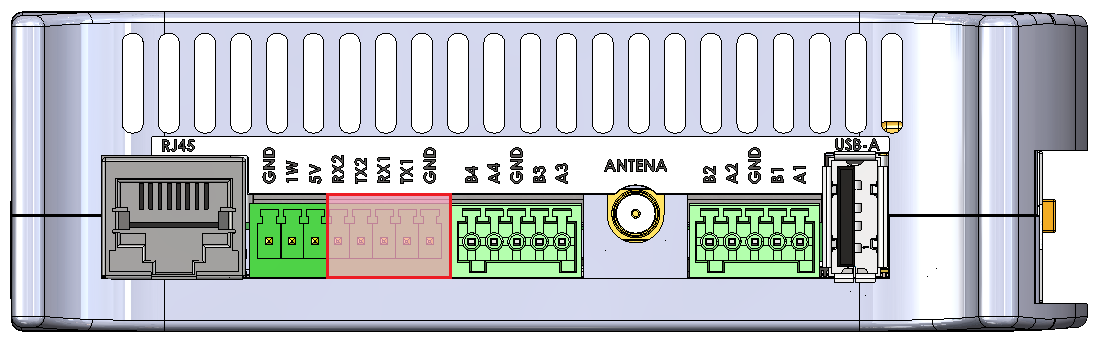
|
Connector pin |
Description |
|
T1 |
RS232 TX1 |
|
R1 |
RS232 RX1 |
|
G |
Ground |
|
T2 |
RS232 TX2 |
|
R2 |
RS232 RX2 |
RS232-1/2 connections diagram
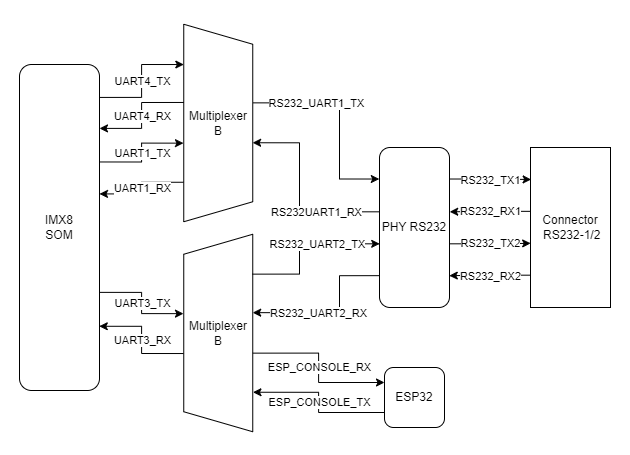
UART4
Device name: /dev/ttymxc3
|
Signal |
Processor pin |
Default function |
|
Receive (UART4 RX) |
F19 |
UART4_RXD |
|
Transmit (UART4 TX) |
F18 |
UART4_TXD |
UART1
Device name: /dev/ttymxc0
|
Signal |
Processor pin |
Default function |
|
Receive (UART1 RX) |
E14 |
UART1_RXD |
|
Transmit (UART1 TX) |
F13 |
UART1_TXD |
UART3
Device name: /dev/ttymxc2
|
Signal |
Processor pin |
Default function |
|
Receive (UART3 RX) |
E18 |
UART3_RXD |
|
Transmit (UART3 TX) |
D18 |
UART3_TXD |
1-Wire
The device is equipped with the 1-Wire interface operating with Maxim sensors. Connector 5 V outputs are secured with a 100 mA fuse.
1-Wire connector and pins
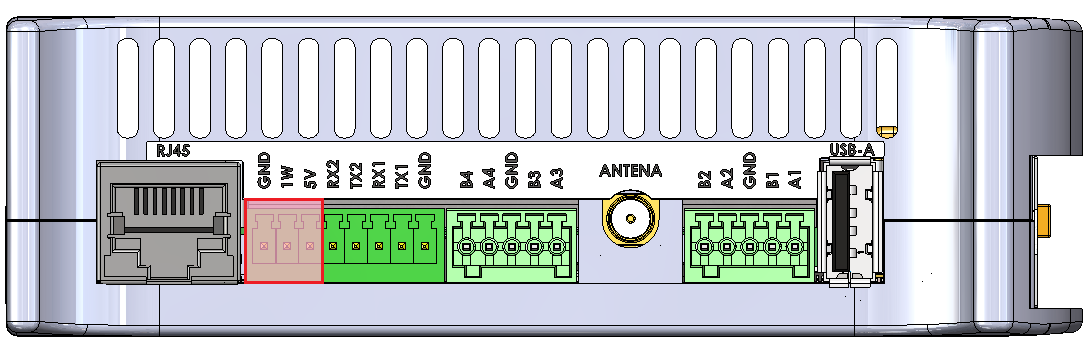
| Connector pin |
Description |
|
1W |
1-Wire data |
|
5V |
1-Wire +5 V power |
|
G |
Ground |
1-Wire connection diagram
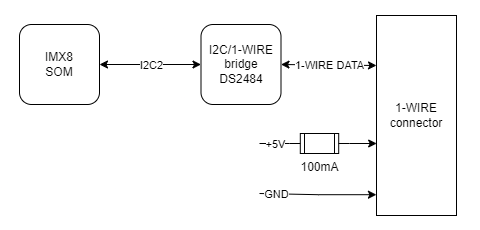
I2C2
Device name: /dev/i2c-1
|
Signal |
Processor pin |
Default function |
|
Clock |
D10 |
I2C2_SCL |
|
Data |
D9 |
I2C2_SDA |
1-Wire bridge
Part number: DS2484
HDMI
The device is equipped with the micro HDMI standard connector located on the front panel.
HDMI connector location
|
Signal |
Processor pin |
Default function |
|
DSI_TX0_N |
A9 |
MIPI_DSI_TX0_N |
|
DSI_TX0_P |
B9 |
MIPI_DSI_TX0_P |
|
DSI_TX1_N |
A10 |
MIPI_DSI_TX1_N |
|
DSI_TX1_P |
B10 |
MIPI_DSI_TX1_P |
|
DSI_TX2_N |
A12 |
MIPI_DSI_TX2_N |
|
DSI_TX2_P |
B12 |
MIPI_DSI_TX2_P |
|
DSI_TX3_N |
A13 |
MIPI_DSI_TX3_N |
|
DSI_TX3_P |
B13 |
MIPI_DSI_TX3_P |
|
DSI_CLK_N |
A11 |
MIPI_DSI_CLK_N |
|
DSI_CLK_P |
B11 |
MIPI_DSI_CLK_P |
HDMI connection diagram
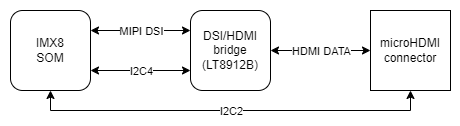
DSI/HDMI Bridge
Part number: LT8912B
I2C4
Device name: /dev/i2c-3
|
Signal |
Processor pin |
Default function |
|
Clock |
D13 |
I2C4_SCL |
|
Data |
E13 |
I2C4_SDA |
I2C2
Device name: /dev/i2c-1
|
Signal |
Processor pin |
Default function |
|
Clock |
D10 |
I2C2_SCL |
|
Data |
D9 |
I2C2_SDA |
ETHERNET
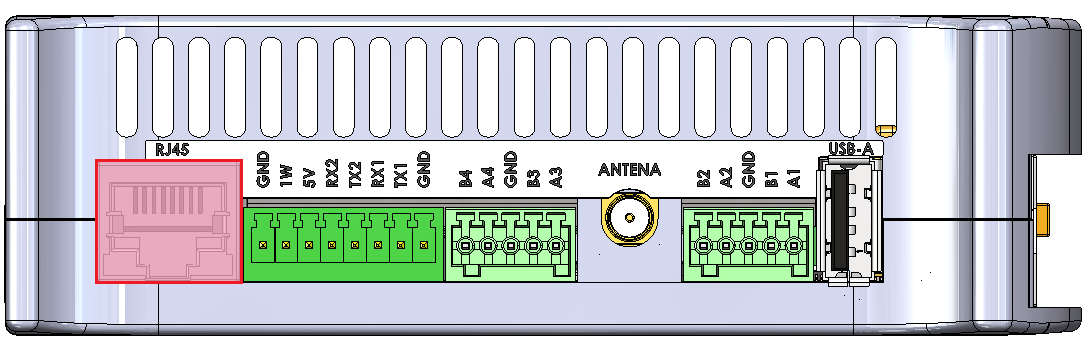
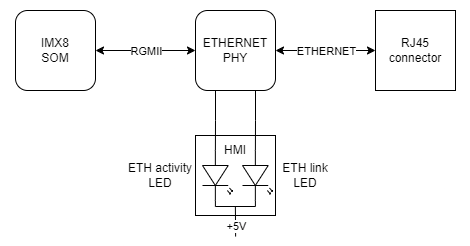
The device is equipped with a RJ45 connector placed on the side of the device. The diode on the front panel indicates ETHERNET's operation.
RJ45 connector location
ETHERNET connection diagram
GSM
The device is equipped with the SIM7600E module connected with the miniPCIE connector. Its features:
- operation of protocols: CP, UDP, PPP, HTTP, FTP, MQTT, SMS, Mail
- GNSS (GPS, GLONASS, BeiDou) positioning
- the microSIM card can be installed
- the device can be expanded with an antenna
- LED on the front panel indicates GSM operation
Device name: SIM7600E
MicroSIM connector
|
Function |
Processor pin |
Default function |
|
USB power switch control |
F23 |
USB2_VBUS |
|
USB data differential pair negative |
A23 |
USB2_D_N |
|
USB data differential pair positive |
B23 |
USB2_D_P |
GSM connection diagram
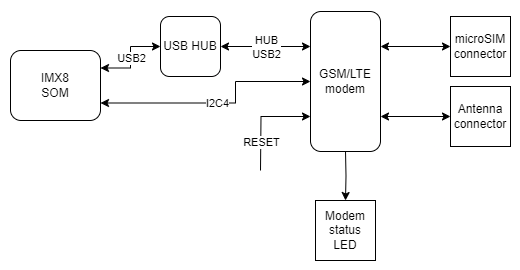
USB HUB
Part number: USB2533I-1080AEN
I2C4
Device name: /dev/i2c-3
|
Signal |
Processor pin |
Default function |
|
Clock |
D13 |
I2C4_SCL |
|
Data |
E13 |
I2C4_SDA |
MicroSD slot
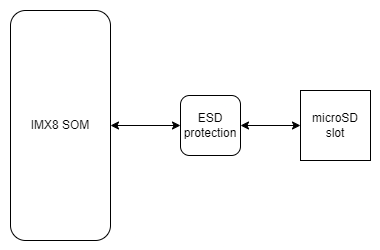
The device is equipped with a microSD card slot, connected directly to the CPU.
|
Function |
Processor pin |
Default function |
| SD data line 0 | AB23 | SD2_DATA0 |
| SD data line 1 | AB24 | SD2_DATA1 |
| SD data line 2 | V24 | SD2_DATA2 |
| SD data line 3 | V23 | SD2_DATA3 |
| SD command line | W24 | SD2_CMD |
| SD clock | W23 | SD2_CLK |
Wi-Fi/2.4G
The SOM is equipped with a Wi-Fi/2.4G module and can be connected to the dedicated IPX antenna connector or expanded with a Wi-Fi antenna which takes the place of digital inputs no. 1 and 2. The module is dual-band and operates on the frequencies of 2.4 and 5 GHz in 802.11.ac/a/b/g/n standard. The antennas can also be connected directly to the GSM module depending on the current needs.
Wi-Fi connections diagram
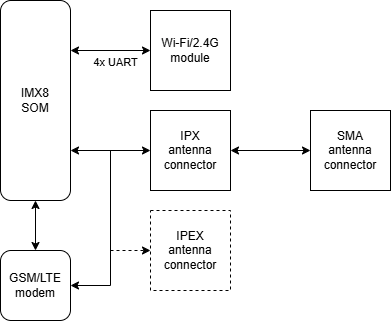
Wi-Fi module
Part number: Sterling-LWB5
Digital inputs
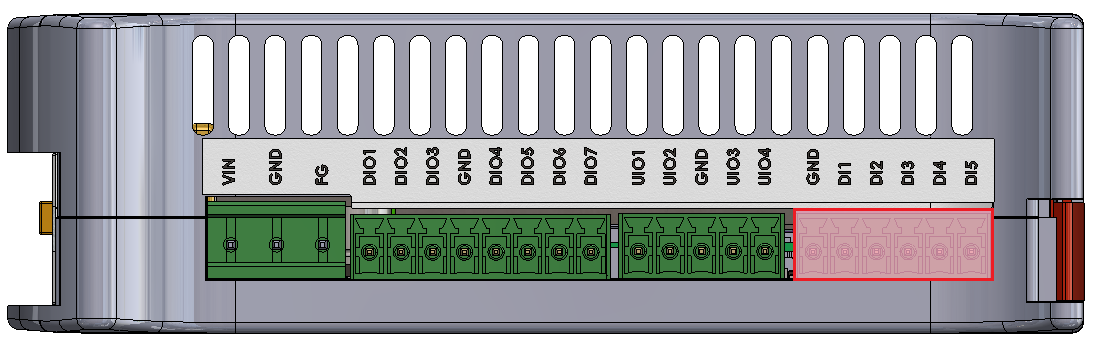
The device is equipped with a 5-pin digital inputs (DI) connector with a maximum voltage of 30 V and a dry contact. Input signals connect directly to the CPU.
DIs location on the connector
|
DI connector pin |
Processor pin |
User-space name |
|
|
DI1 |
AC22 |
gpiochip3 26 |
"DI1" |
|
DI2 |
AD23 |
gpiochip3 24 |
"DI2" |
|
DI3 |
AB22 |
gpiochip3 22 |
"DI3" |
|
DI4 |
AD15 |
gpiochip2 25 |
"DI4" |
|
DI5 |
AC13 |
gpiochip2 24 |
"DI5" |
DI circuit block schematic
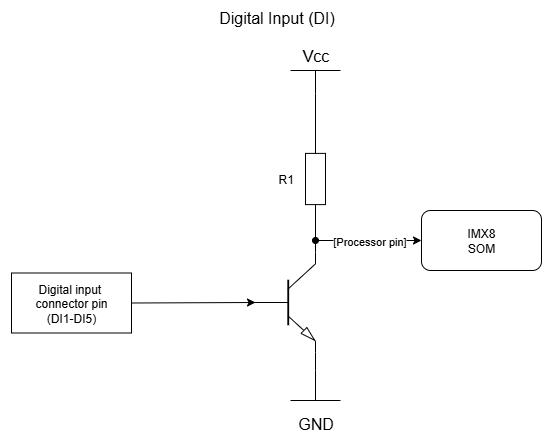
- R1 - push-up resistor 47 kΩ
Digital inputs/outputs
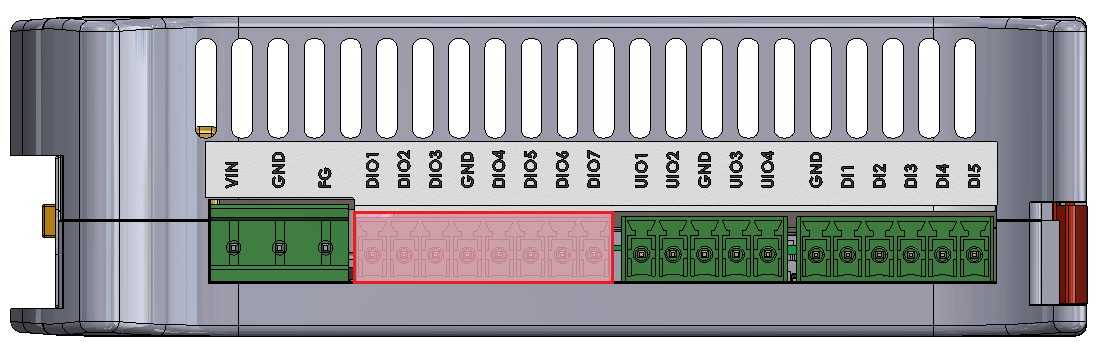
The device is equipped with 7 digital input/output (DIO) connectors. They can operate as:
- digital input with a maximal voltage of 30 V and a dry contact
- digital Vin output with a maximal current of 200 mA
DIOs location on the connector
|
DIO connector pin |
Input |
Output |
||
|
User-space name |
Expander E pin |
User-space name |
Expander A pin |
|
|
DIO1 |
gpiochip5 9 |
24 |
gpiochip7 1 |
1 |
|
DIO2 |
gpiochip5 10 |
25 |
gpiochip7 2 |
2 |
|
DIO3 |
gpiochip5 11 |
28 |
gpiochip7 3 |
3 |
|
DIO4 |
gpiochip5 12 |
1 |
gpiochip7 4 |
4 |
|
DIO5 |
gpiochip5 13 |
2 |
gpiochip7 5 |
5 |
|
DIO6 |
gpiochip5 14 |
3 |
gpiochip7 6 |
6 |
|
DIO7 |
gpiochip5 15 |
4 |
gpiochip7 7 |
7 |
DIO circuit block schematic
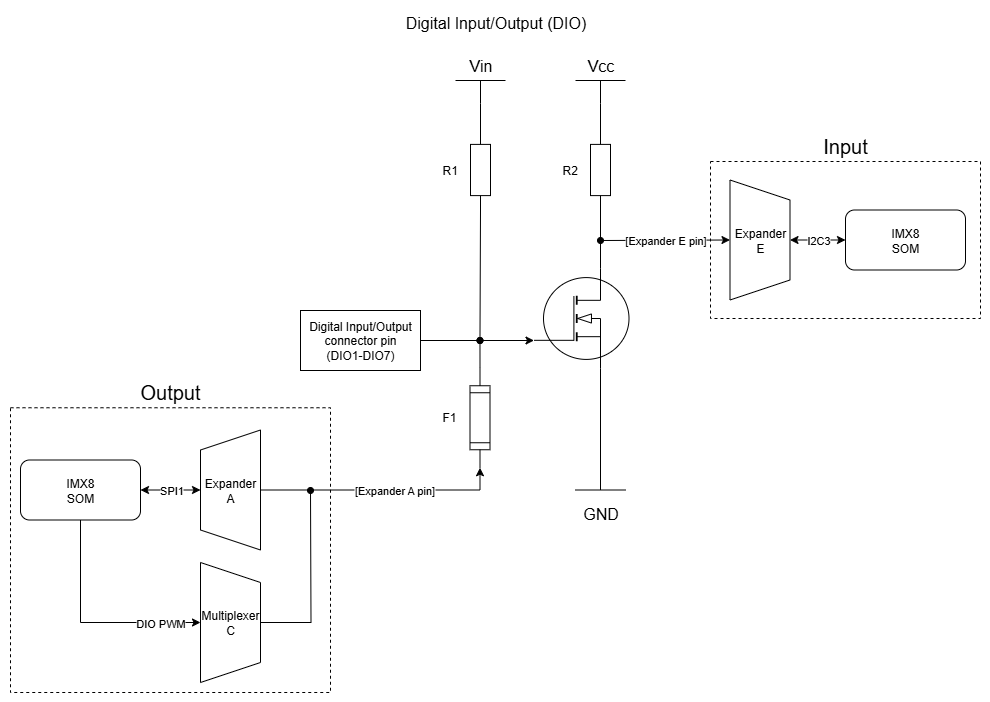
- F1 - 200 mA fuse
- R1 - pull-up resistor 10 kΩ
- R2 - pull-up resistor 47 kΩ
Expander E
The circuit's inputs are connected to the expander E via the I2C3 interface.
Expander A
Outputs of the circuit are connected to the expander A via the SPI1 interface.
Universal inputs/outputs
The device is equipped with 4 universal analog-digital inputs/outputs (UIOs). They can operate as:
- DC voltage inputs for voltage in the range of 0-10 V with the input resistance of 100 kΩ
- current inputs for current in the range of 0-4-20 mA with the input resistance of 200 Ω
- current outputs with the range of 4-20 mA
- temperature inputs of sensors: Pt1000, Ni1000, KTY, NTC
- resistance inputs with the range of 0-5000 Ω
- dry contact inputs
- analog to digital converters with 24-bit resolution
- digital to analog converters with 12-bit resolution
Voltage is measured using a 2-channel analog-to-digital converter with 24-bit resolution.
A current value can be set using a 4-channel digital-to-analog converter.
UIOs location on the connector
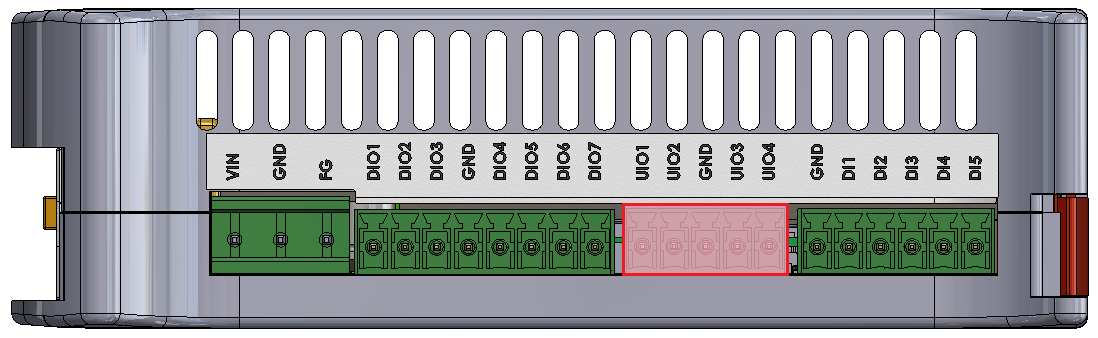
Diagram of UIO circuit
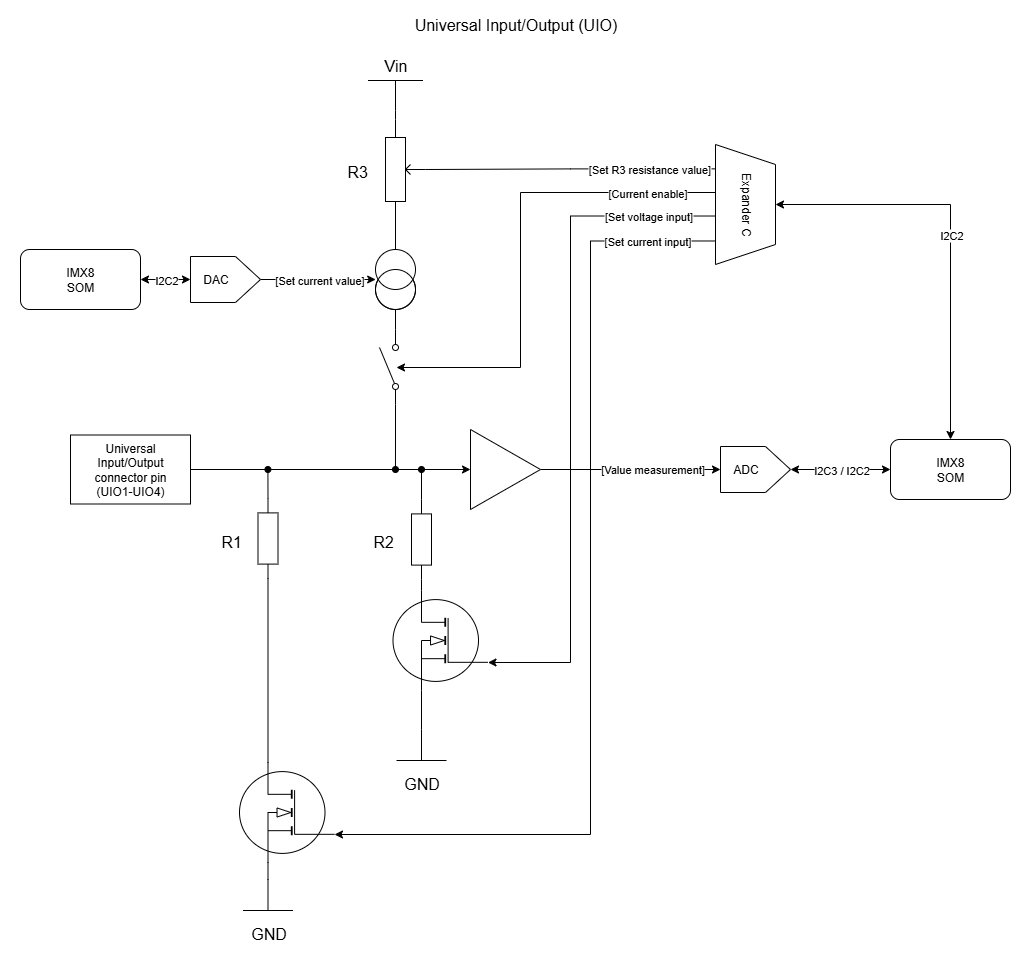
- R1 - 200 Ω/1% measurement resistor
- R2 - 100 kΩ/1% measurement resistor
- R3 - switchable resistor for changing range of current sources (649 Ω/1% or 1,649 Ω/1%)
User-space access
Analog-Digital Converter A Device name: /sys/bus/iio/devices/iio:device0
Analog-Digital Converter B Device name: /sys/bus/iio/devices/iio:device1
Digital-Analog Converter A Device name: /sys/bus/iio/devices/iio:device2
Possible configurations
Switching to particular modes of the circuit is realized by “Set voltage input”, “Set current input”, “Current enable”, “Set R3 resistance value” and “Set current value” signals.
|
Configuration signal |
Modes of operation |
|||
|---|---|---|---|---|
|
DI dry contact |
AI 0-10 V |
AI 0-4-20 mA |
AO 4-20 mA / temperature* / resistance |
|
|
Set voltage input |
0 |
1 |
0 |
0 |
|
Set current input |
0 |
1 |
0 |
1 |
|
Current enable |
1 |
0 |
0 |
1 |
|
Set R3 resistance value |
1 |
X |
X |
1 or 0** |
|
Set current value |
12-bit value*** |
X |
X |
12-bit value*** |
* by measuring resistance
** 1 for 1,649 kΩ/1% or 0 for 649 Ω/1% resistor
*** depends on the sensor (see examples for more)
- X - any value
- DI - digital input
- AI - analog input
- AO - analog output
|
UIO connector pin |
Configuration signal |
Expander C pin |
|
UIO1 |
Current enable |
20 |
|
Set voltage input |
19 |
|
|
Set current input |
27 |
|
|
Set R3 resistance value |
21 |
|
|
UIO2 |
Current enable |
3 |
|
Set voltage input |
22 |
|
|
Set current input |
28 |
|
|
Set R3 resistance value |
4 |
|
|
UIO3 |
Current enable |
23 |
|
Set voltage input |
17 |
|
|
Set current input |
1 |
|
|
Set R3 resistance value |
18 |
|
|
UIO4 |
Current enable |
26 |
|
Set voltage input |
24 |
|
|
Set current input |
2 |
|
|
Set R3 resistance value |
25 |
Expander C
The circuit's inputs are connected to the expander C via the I2C2 interface.
I2C3
Device name: /dev/i2c-2
|
Signal |
Processor pin |
Default function |
|
Clock |
E10 |
I2C3_SCL |
|
Data |
F10 |
I2C3_SDA |
I2C2
Device name: /dev/i2c-1
|
Signal |
Processor pin |
Default function |
|
Clock |
D10 |
I2C2_SCL |
|
Data |
D9 |
I2C2_SDA |