
Front Panel
View of the front panel

DIP switch
The device has a DIP switches on the front panel which enable the control of various key functions such as:
- booting mode choice
- microUSB signal choice
- choosing Linux console or RS232 signal
- realisation of a user written code
DIP switch placement on front panel
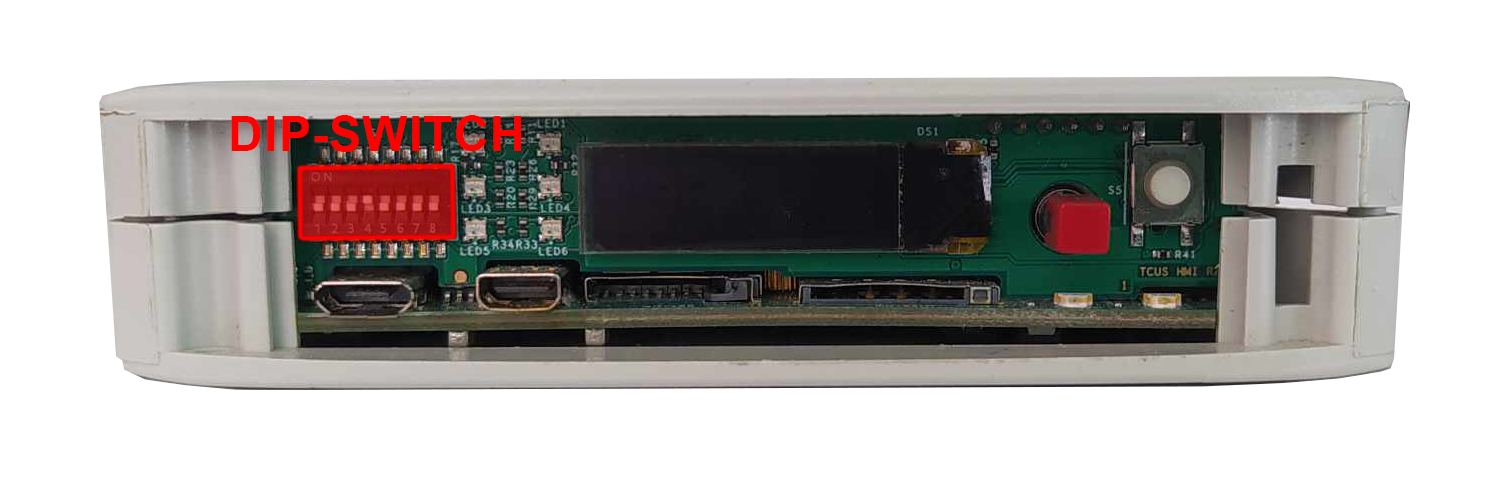
Switch options
|
Switch No. |
Positions |
Descripton |
|---|---|---|
|
1 |
OFF- eMMC boot ON - USB boot |
Boot select - switching between booting device |
|
2 |
2: OFF 3: OFF - SOM USB 2: ON 3: OFF - none 2: OFF 3: ON - UART4 (Linux console) 2: ON 3: ON - ESP UART |
USB select - microUSB signal choice |
|
3 |
||
|
4-5 |
Unassigned |
Currently not used |
|
6-8 |
OFF/ON |
User options |
Connections diagram
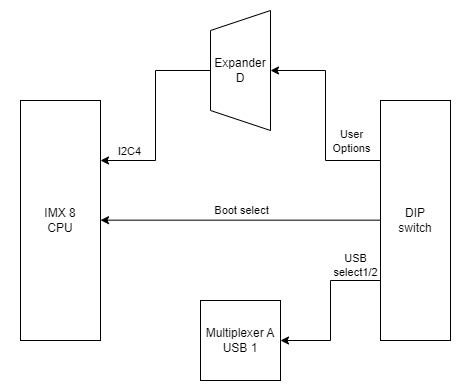
Expander D
User defined DIP-Switch options are connected to the expander D which is connected to the CPU via I2C4 interface.
USB1
USB select 1 and USB select 2 signals are connected to the multiplexer A associated with USB1.