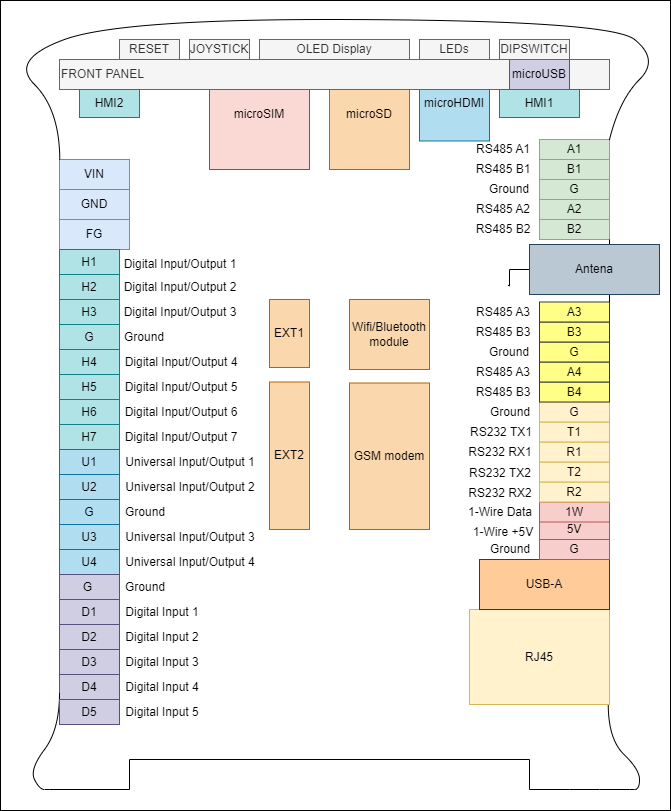
External Interfaces
DIO_Read
This example shows how to use DIO (Digital Input Output) of the Tiger computer in the read mode. After running the program, the state of the every DIO will be displayed.
Connections
In order to test the program use H1 - H7 pins (diagram provided on the bottom of this page).
DIO_Write
This example shows how to use DIO (Digital Input Output) of the Tiger computer in the write mode.
Connections
In order to test the program use H1 - H7 pins (diagram provided on the bottom of this page).
DI_Read
This example shows how to read state of the DI (Digital Input) of the Tiger computer. After running the program, the state of the every DI will be displayed.
Connections
In order to test the program use D1 - D5 pins (diagram provided on the bottom of this page).
ETHERNET
This example shows how to check the Ethernet port connection of the Tiger computer.
- ETHERNET - C example
- ETHERNET - Python example
- ETHERNET - Bash example
Connections
In order to test the program use the RJ45 port.
ConnectionsPorts diagram