System Console
Tiger City IMX Industrial Computer with Linux OS
UART console
Connecting the adapter to the device
To display the console via UART an RS232 → USB adapter needs to be connected to the pins of the connector shown on the picture below.
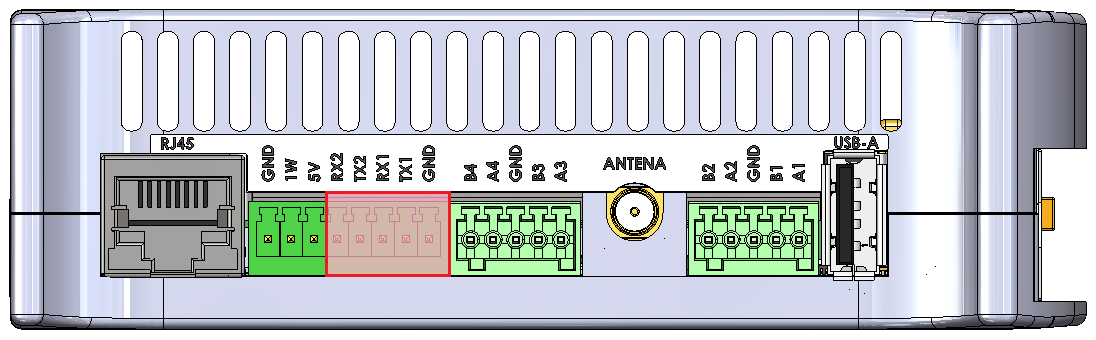
Configuring COM port
A serial port terminal needs to be configured with following configuration:
|
Bits per second |
115200 |
| Data bits | 8 |
| Parity | None |
| Stop bits | 1 |
Then, booting from the chosen source should be realized according to the instruction.
SSH console
Finding an IP of the device
The device's IP can be obtained via 2 methods:
- connecting to the UART console and inputting the “ip a” command when logged as root or other user
- using the joystick shown in the picture below the IP can be displayed on the front panel display
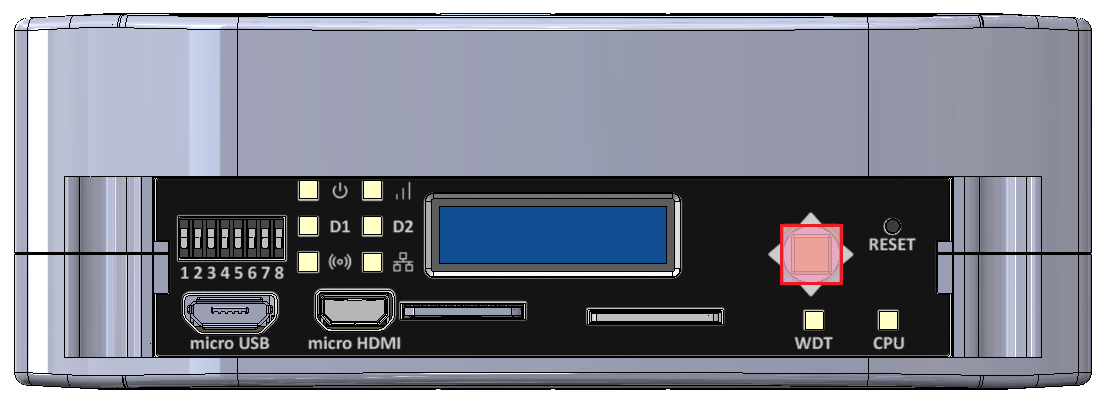
Configuring COM port
The SSH terminal needs to be configured with the IP of the device. Then, booting from the chosen source should be realized according to the instruction.