# Front Panel

## {{@273#bkmrk-tiger-city-imx-embed}}

### View of the front panel  


[![image.png](https://doc.redisage.com/uploads/images/gallery/2026-03/scaled-1680-/l11image.png)](https://doc.redisage.com/uploads/images/gallery/2026-03/l11image.png)

### Components of the front panel  


- [{{@135#bkmrk-dip-switch}}](https://doc.redisage.com/link/135#bkmrk-dip-switch)
- [{{@135#bkmrk-signal-leds}}](https://doc.redisage.com/link/135#bkmrk-signal-leds)
- [{{@135#bkmrk-oled-display}}](https://doc.redisage.com/link/135#bkmrk-oled-display)
- [{{@135#bkmrk-%C2%A0}}](https://doc.redisage.com/link/135#bkmrk-%C2%A0)
- [{{@135#bkmrk-reset-button}}](https://doc.redisage.com/link/135#bkmrk-reset-button)

### DIP switches

The device has DIP switches on the front panel which enable the control of various key functions such as:

- booting mode choice
- microUSB signal choice
- choosing Linux console or RS232 signal
- user-written code

#### DIP switches placement on the front panel

[![image.png](https://doc.redisage.com/uploads/images/gallery/2026-03/scaled-1680-/3HJimage.png)](https://doc.redisage.com/uploads/images/gallery/2026-03/3HJimage.png)

#### Switch options  


<table border="1" id="bkmrk-switch-no.-positions" style="border-collapse: collapse; width: 100%; height: 209.344px;"><colgroup><col style="width: 33.3745%;"></col><col style="width: 33.3745%;"></col><col style="width: 33.3745%;"></col></colgroup><thead><tr style="height: 35.3906px;"><td aria-sort="Brak" class="ak-renderer-tableHeader-sortable-column__wrapper align-center" data-colwidth="96" style="height: 35.3906px;">**<span data-id="c90e1944-a6be-4863-9c07-bb9cb73b8543" data-mark-annotation-type="inlineComment" data-mark-type="annotation" data-renderer-mark="true" id="bkmrk-switch-no.">Switch No.</span>**

</td><td aria-sort="Brak" class="ak-renderer-tableHeader-sortable-column__wrapper align-center" data-colwidth="301" style="height: 35.3906px;">**<span data-id="c90e1944-a6be-4863-9c07-bb9cb73b8543" data-mark-annotation-type="inlineComment" data-mark-type="annotation" data-renderer-mark="true" id="bkmrk-positions">Positions</span>**

</td><td aria-sort="Brak" class="ak-renderer-tableHeader-sortable-column__wrapper align-center" data-colwidth="363" style="height: 35.3906px;">**<span data-id="c90e1944-a6be-4863-9c07-bb9cb73b8543" data-mark-annotation-type="inlineComment" data-mark-type="annotation" data-renderer-mark="true" id="bkmrk-descripton"><span data-id="11cf9c03-f2aa-43f3-a521-9b9f17342ab9" data-mark-annotation-type="inlineComment" data-mark-type="annotation" data-renderer-mark="true" id="bkmrk-descripton-1">Description</span></span>**

</td></tr></thead><tbody><tr style="height: 57.7812px;"><td data-colwidth="96" style="height: 57.7812px;">1

</td><td data-colwidth="301" style="height: 57.7812px;">OFF - eMMC boot

ON - SD card boot

</td><td data-colwidth="363" style="height: 57.7812px;">Boot select - switching between booting device

</td></tr><tr style="height: 10px;"><td data-colwidth="96" style="height: 10px;">2

</td><td data-colwidth="301" style="height: 10px;">OFF - USB1 OTG

ON - UART4 (Linux console)

</td><td data-colwidth="363" style="height: 10px;">USB select - microUSB signal choice

</td></tr><tr style="height: 35.3906px;"><td data-colwidth="96" style="height: 35.3906px;">3

</td><td style="height: 35.3906px;">OFF - UART1 (SOM user)

ON - UART4 (Linux console)

</td><td style="height: 35.3906px;">RS232 - SOM UART RS232 select

</td></tr><tr><td>4

</td><td>OFF - UART2 RS232 user

ON - ESP32 console

</td><td>RS232 - SOM UART RS232/ESP32 select

</td></tr><tr style="height: 35.3906px;"><td data-colwidth="96" style="height: 35.3906px;">5

</td><td data-colwidth="301" style="height: 35.3906px;">Unassigned

</td><td data-colwidth="363" style="height: 35.3906px;">Currently not used

</td></tr><tr style="height: 35.3906px;"><td data-colwidth="96" style="height: 35.3906px;">6-8

</td><td data-colwidth="301" style="height: 35.3906px;">OFF/ON

</td><td data-colwidth="363" style="height: 35.3906px;">User options

</td></tr></tbody></table>

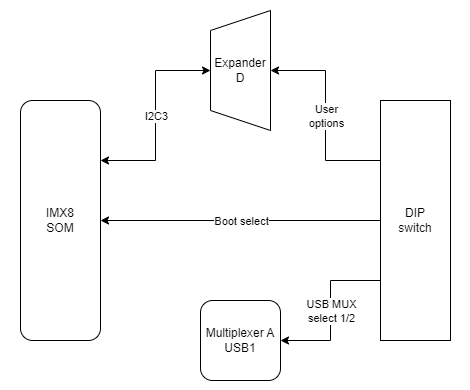
#### Connections diagram  


<div drawio-diagram="1012"><img src="https://doc.redisage.com/uploads/images/drawio/2024-07/drawing-22-1721212551.png" alt=""/></div>

#### [{{@136#bkmrk-expander-d}}](https://doc.redisage.com/link/136#bkmrk-expander-d)

User-defined DIP switch options are connected to the expander D which is connected to the CPU via the I2C3 interface.

#### [{{@133#bkmrk-usb1}}](https://doc.redisage.com/link/133#bkmrk-usb1)

The USB MUX select 1 and the USB MUX select 2 signals are connected to the multiplexer A associated with USB1.

### Signal LEDs

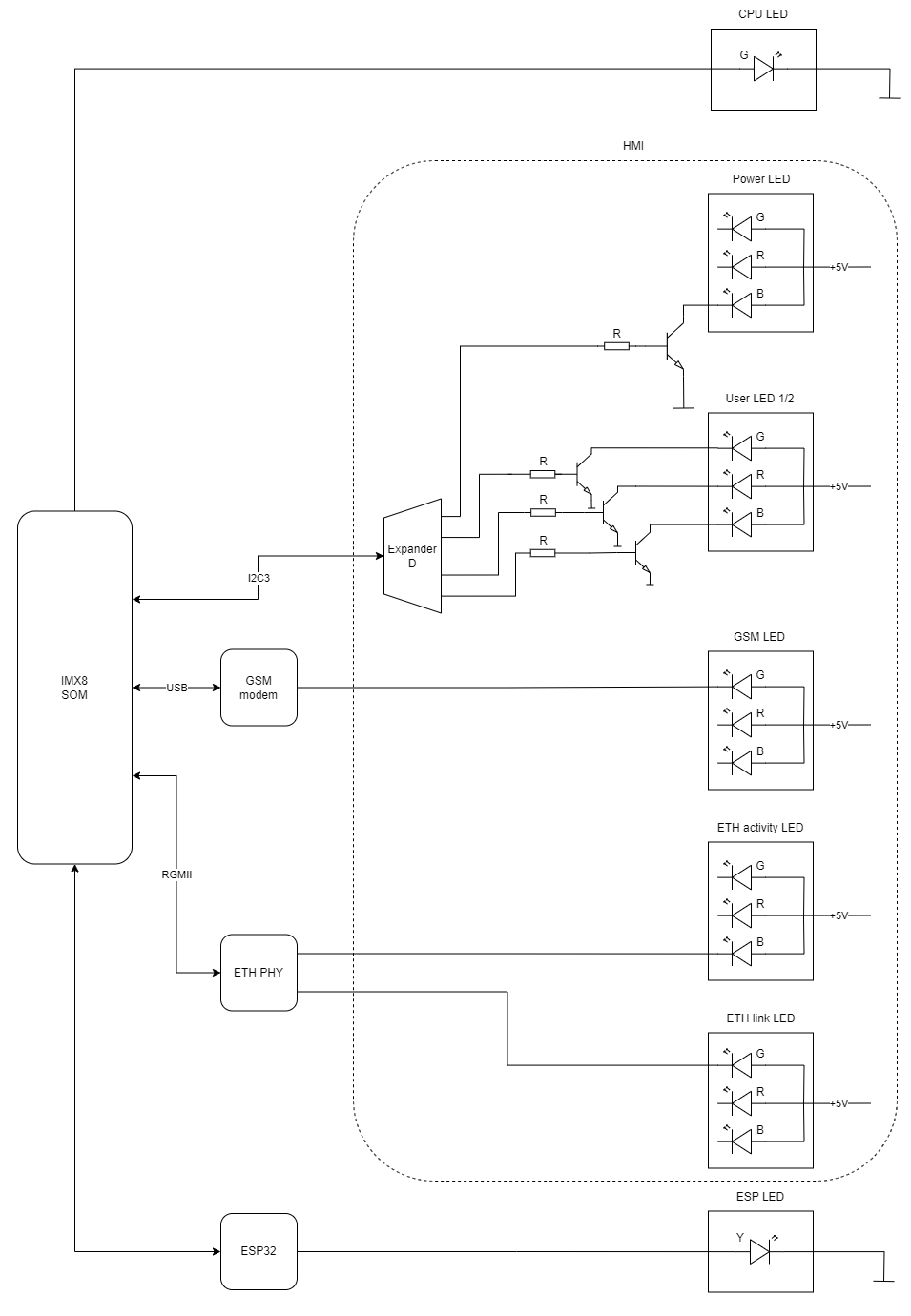
The device is equipped with 8 LEDs. 2 of these LEDs are placed on the mainboard, while the other 6 are on the front panel of the HMI board.

#### LEDs location  


[![image.png](https://doc.redisage.com/uploads/images/gallery/2026-03/scaled-1680-/LoPimage.png)](https://doc.redisage.com/uploads/images/gallery/2026-03/LoPimage.png)

#### LEDs connections  


<table border="1" id="bkmrk-description-user-spa" style="border-collapse: collapse; width: 100%; height: 238.375px;"><colgroup><col style="width: 33.4905%;"></col><col style="width: 31.3485%;"></col><col style="width: 35.1609%;"></col></colgroup><thead><tr style="height: 29.7969px;"><td aria-sort="Brak" class="ak-renderer-tableHeader-sortable-column__wrapper align-center" style="height: 29.7969px;">**Description**

</td><td aria-sort="Brak" class="ak-renderer-tableHeader-sortable-column__wrapper align-center" style="height: 29.7969px;">**User-space name**

</td><td class="align-center" style="height: 29.7969px;">**Label**

</td></tr></thead><tbody><tr><td>Power LED</td><td>gpiochip6 9

</td><td>"LED\_5V"

</td></tr><tr style="height: 29.7969px;"><td style="height: 29.7969px;">CPU LED</td><td style="height: 29.7969px;">gpiochip0 3

</td><td class="align-left" style="height: 29.7969px;">"LED\_MAINBOARD"

</td></tr><tr style="height: 29.7969px;"><td style="height: 29.7969px;">User LED 1 G

</td><td style="height: 29.7969px;">gpiochip6 10

</td><td class="align-left" style="height: 29.7969px;">"LED3\_GREEN"

</td></tr><tr style="height: 29.7969px;"><td style="height: 29.7969px;">User LED 1 R

</td><td style="height: 29.7969px;">gpiochip6 5

</td><td class="align-left" style="height: 29.7969px;">"LED3\_RED"

</td></tr><tr style="height: 29.7969px;"><td style="height: 29.7969px;">User LED 1 B

</td><td style="height: 29.7969px;">gpiochip6 12

</td><td class="align-left" style="height: 29.7969px;">"LED3\_BLUE"

</td></tr><tr style="height: 29.7969px;"><td style="height: 29.7969px;">User LED 2 G

</td><td style="height: 29.7969px;">gpiochip6 13

</td><td class="align-left" style="height: 29.7969px;">"LED4\_GREEN"

</td></tr><tr style="height: 29.7969px;"><td style="height: 29.7969px;">User LED 2 R

</td><td style="height: 29.7969px;">gpiochip6 11

</td><td class="align-left" style="height: 29.7969px;">"LED4\_RED"

</td></tr><tr style="height: 29.7969px;"><td style="height: 29.7969px;">User LED 2 B

</td><td style="height: 29.7969px;">gpiochip6 15

</td><td class="align-left" style="height: 29.7969px;">"LED4\_BLUE"

</td></tr></tbody></table>

#### LED connection diagram  


<div drawio-diagram="1013"><img src="https://doc.redisage.com/uploads/images/drawio/2024-07/drawing-22-1721212568.png" alt=""/></div>

#### [{{@166#bkmrk-esp32-microcontrolle}}](https://doc.redisage.com/link/166#bkmrk-esp32-microcontrolle)

ESP LED is connected directly to the ESP32 microcontroller.

#### [{{@133#bkmrk-%C2%A0-4}}](https://doc.redisage.com/link/133#bkmrk-%C2%A0-4)

GSM LED is connected directly to the GSM modem.

#### [{{@133#bkmrk-%C2%A0-3}}](https://doc.redisage.com/link/133#bkmrk-%C2%A0-3)

ETH activity LED and ETH link LED are connected directly to the ETHERNET physical layer.

#### [{{@136#bkmrk-expander-d}}](https://doc.redisage.com/link/136#bkmrk-expander-d)

Power LED, User LED 1 and User LED2 are connected to the expander D which is connected to the CPU via the I2C3 interface.

### OLED display

The device is equipped with a 0.87” black and white display with a resolution of 128x32 px.

#### OLED display placement  


[![image.png](https://doc.redisage.com/uploads/images/gallery/2026-03/scaled-1680-/1jnimage.png)](https://doc.redisage.com/uploads/images/gallery/2026-03/1jnimage.png)

#### OLED device

Part number: **SCE087002-V01**

**[![a22f77ff-98ae-4a34-b0e5-0d5916ee80bd.png](https://doc.redisage.com/uploads/images/gallery/2024-04/scaled-1680-/a22f77ff-98ae-4a34-b0e5-0d5916ee80bd.png)](https://doc.redisage.com/uploads/images/gallery/2024-04/a22f77ff-98ae-4a34-b0e5-0d5916ee80bd.png)**

#### OLED connections table  


<table border="1" id="bkmrk-oled-pin-description" style="border-collapse: collapse; width: 100%; height: 148.984px;"><colgroup><col style="width: 33.3745%;"></col><col style="width: 33.3745%;"></col><col style="width: 33.3745%;"></col></colgroup><thead><tr style="height: 29.7969px;"><td aria-sort="Brak" class="ak-renderer-tableHeader-sortable-column__wrapper align-center" style="height: 29.7969px;">**<span data-id="8fddd7ba-1a60-42cc-a4a9-cf607218117c" data-mark-annotation-type="inlineComment" data-mark-type="annotation" data-renderer-mark="true" id="bkmrk-oled-pin">OLED pin</span>**

</td><td aria-sort="Brak" class="ak-renderer-tableHeader-sortable-column__wrapper align-center" style="height: 29.7969px;">**<span data-id="8fddd7ba-1a60-42cc-a4a9-cf607218117c" data-mark-annotation-type="inlineComment" data-mark-type="annotation" data-renderer-mark="true" id="bkmrk-description">Description</span>**

</td><td aria-sort="Brak" class="ak-renderer-tableHeader-sortable-column__wrapper align-center" style="height: 29.7969px;">**User-space name**

</td></tr></thead><tbody><tr style="height: 29.7969px;"><td style="height: 29.7969px;">RES#

</td><td style="height: 29.7969px;">RESET

</td><td style="height: 29.7969px;"> X

</td></tr><tr style="height: 29.7969px;"><td style="height: 29.7969px;">SCL

</td><td style="height: 29.7969px;">I2C3 clock

</td><td style="height: 29.7969px;"> X

</td></tr><tr style="height: 29.7969px;"><td style="height: 29.7969px;">SDA

</td><td style="height: 29.7969px;">I2C3 data

</td><td style="height: 29.7969px;"> X

</td></tr><tr style="height: 29.7969px;"><td style="height: 29.7969px;">VCC

</td><td style="height: 29.7969px;">OLED ON/OFF

</td><td style="height: 29.7969px;">gpiochip6 14, "OLED\_EN"

</td></tr></tbody></table>

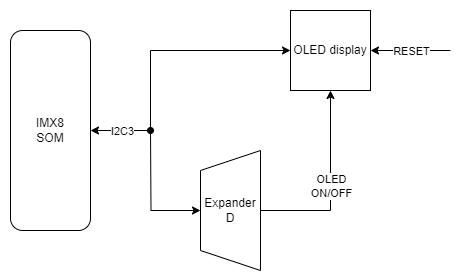
#### OLED connections diagram  


<div drawio-diagram="1014"><img src="https://doc.redisage.com/uploads/images/drawio/2024-07/drawing-22-1721212591.png" alt=""/></div>

#### [{{@136#bkmrk-expander-d}}](https://doc.redisage.com/link/136#bkmrk-expander-d)

The OLED display is connected to Expander D which is connected to the CPU via the I2C3 interface.

#### [{{@134#bkmrk-i2c4}}](https://doc.redisage.com/link/134#bkmrk-i2c4)

The OLED display is directly connected to the CPU via the I2C3 interface.

### Joystick

The device is equipped with a joystick for controlling its functions.

#### Placement  


[![image.png](https://doc.redisage.com/uploads/images/gallery/2026-03/scaled-1680-/blkimage.png)](https://doc.redisage.com/uploads/images/gallery/2026-03/blkimage.png)

#### Device

Part number: **INT-1500D**

[![9433a74a-a6fe-4496-9718-ff54f38e8817.png](https://doc.redisage.com/uploads/images/gallery/2024-04/scaled-1680-/9433a74a-a6fe-4496-9718-ff54f38e8817.png)](https://doc.redisage.com/uploads/images/gallery/2024-04/9433a74a-a6fe-4496-9718-ff54f38e8817.png)

#### Connections table  


<table border="1" id="bkmrk-joystick-signal-expa" style="border-collapse: collapse; width: 100%;"><colgroup><col style="width: 26.5793%;"></col><col style="width: 25.6252%;"></col><col style="width: 26.8182%;"></col><col style="width: 21.0965%;"></col></colgroup><thead><tr><td aria-sort="Brak" class="ak-renderer-tableHeader-sortable-column__wrapper align-center">**<span data-id="e216e3e3-a3f9-4302-85e1-946b8097c925" data-mark-annotation-type="inlineComment" data-mark-type="annotation" data-renderer-mark="true" id="bkmrk-joystick-signal">Joystick signal</span>**

</td><td aria-sort="Brak" class="ak-renderer-tableHeader-sortable-column__wrapper align-center">**<span data-id="e216e3e3-a3f9-4302-85e1-946b8097c925" data-mark-annotation-type="inlineComment" data-mark-type="annotation" data-renderer-mark="true" id="bkmrk-expander-d-pin">Expander D pin</span>**

</td><td aria-sort="Brak" class="ak-renderer-tableHeader-sortable-column__wrapper align-center">**User-space name**

</td><td>**Label**

</td></tr></thead><tbody><tr><td>Right

</td><td>20

</td><td>gpiochip6 3

</td><td>"JOY\_RIGHT"

</td></tr><tr><td>Up

</td><td>18

</td><td>gpiochip6 1

</td><td>"JOY\_UP"

</td></tr><tr><td>Left

</td><td>17

</td><td>gpiochip6 0

</td><td>"JOY\_LEFT"

</td></tr><tr><td>Down

</td><td>19

</td><td>gpiochip6 2

</td><td>"JOY\_DOWN"

</td></tr><tr><td>Push

</td><td>21

</td><td>gpiochip6 4

</td><td>"JOY\_PUSH"

</td></tr></tbody></table>

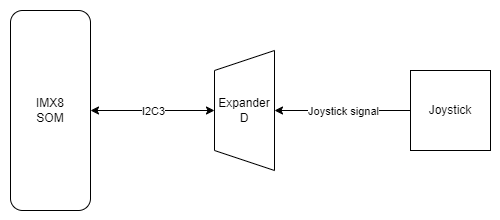
#### Connection diagram  


<div drawio-diagram="1015"><img src="https://doc.redisage.com/uploads/images/drawio/2024-07/drawing-22-1721212609.png" alt=""/></div>

#### [{{@136#bkmrk-expander-d}}](https://doc.redisage.com/link/136#bkmrk-expander-d)

Joystick is connected to the Expander D which is connected to the CPU via the I2C3 interface.

### Reset button

The device has a reset button on the front panel.

#### Reset button location  


[![image.png](https://doc.redisage.com/uploads/images/gallery/2026-03/scaled-1680-/KDFimage.png)](https://doc.redisage.com/uploads/images/gallery/2026-03/KDFimage.png)

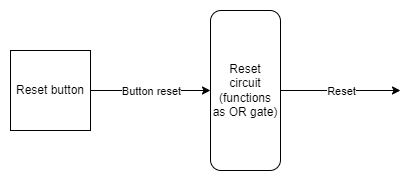
#### Connections diagram  


<div drawio-diagram="1017"><img src="https://doc.redisage.com/uploads/images/drawio/2024-07/drawing-22-1721212642.png" alt=""/></div>

#### [{{@166#bkmrk-watchdog-%2B-reset}}](https://doc.redisage.com/link/166#bkmrk-watchdog-%2B-reset)

The reset button is connected directly to the reset circuit.